
Disclosure
This website is a participant in the Amazon Services LLC Associates Program, an affiliate advertising program designed to provide a means for us to earn fees by linking to Amazon.com and affiliated sites.
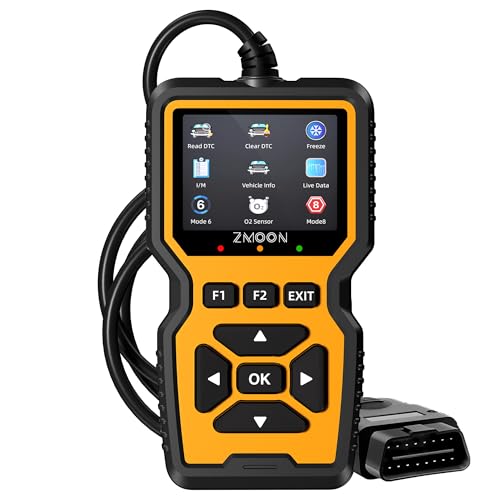
The Zmoon ZM201 OBD2 Scanner Diagnostic Tool is a plug-and-play engine code reader best suited for DIY car owners who want to read and clear check engine lights at home, and it delivers a 50,000-code built-in DTC database on a 2.8-inch color screen. It draws power straight from the 16PIN OBD2 port, so there’s no battery or charging to deal with.
In my testing, the shortcut keys and visual status indicators made the menu layout easy to follow without the manual. The honest catch is that the ZM201 handles engine codes only, so it won’t read ABS, SRS, or transmission systems. If you need those advanced modules, look at a higher-tier bidirectional scanner instead.
- [ Wide Vehicle Compatibility ] This OBD2 diagnostic scanner works for...
- [ Essential Engine Diagnostics, Save Time & Cost ] Quickly read and...
- [ Live Data & Freeze Frame Diagnostics ] Go beyond basic code reading...
What Stands Out — Key Features
- Wide Vehicle Compatibility: This works on all vehicles after 1996 in the US, 2002 in the EU, and 2008 in Asia that have a standard 16PIN OBD2 port. It supports all OBDII protocols, including KWP2000, ISO9141, J1850 VPW, J1850 PWM, and CAN.
- Engine Diagnostics That Save a Trip: I can read and clear engine fault codes, turn off the check engine light, and check I/M readiness before a smog test. The 50,000-code built-in DTC database helps me understand what’s wrong before I call a shop.
- Live Data and Freeze Frame: It goes past basic codes with a live data stream in graph view, plus freeze frame, O2 sensor tests, onboard monitoring, and EVAP system checks. I like being able to see the sensor readings in real time.
- Clear 2.8-Inch Color Screen: The 320×240 display has adjustable brightness and light/dark modes, so it stays readable in any light. The shortcut keys and visual status indicators mean there’s basically no learning curve.
- Plug and Play: I plug it into the OBD2 port below the steering wheel, turn the ignition on, and get results within seconds. No app and no setup — it powers straight from the vehicle’s port.
- Lifetime Free Software Updates: You get lifetime free software updates, and you can connect to a PC for data review and printing. Just note the PC software runs on Windows XP/7/8/10 only, not Mac.
- Built for Long-Term Use: Each unit is tested before shipment and comes with a 3-year warranty. It’s also made with at least 50% recycled material and safer chemicals.
Full Specifications
Pros & Cons — The Honest Take
✅ What I Like
- It’s ready the second I plug it in — it runs off the vehicle’s OBD2 port, so there’s no battery to charge or app to download.
- The 50,000+ built-in DTC database means I get a plain explanation of the fault code instead of just a number.
- The 2.8-inch 320×240 color screen is easy to read, with adjustable brightness and light/dark modes for bright or dim garages.
- Live data in graph view plus freeze frame, O2 sensor, and EVAP checks gives me real diagnostics, not just a code read.
- It covers all vehicles after 1996 in the US and supports every OBDII protocol, including CAN, KWP2000, ISO9141, J1850 VPW, and J1850 PWM.
❌ What Could Be Better
- It’s engine-only — no ABS, SRS, or transmission codes, so I can’t diagnose airbag or gearbox warnings with it.
- The PC software for data review and printing runs on Windows XP/7/8/10 only, so Mac users are left out.
- It can reset temporary fault codes, but permanent codes only clear after the actual repair is done.
For the DIYer chasing a check engine light, the pros here clearly outweigh the cons. I’d only look elsewhere if I needed ABS, SRS, or transmission diagnostics, because this scanner stays in its engine lane.
⚖️ How Does It Compare?
I picked the ANCEL AD410 and FOXWELL NT301 as the closest alternatives to the Zmoon ZM201 because both are budget-friendly engine code readers aimed at the same DIY crowd. Each one makes a slightly different trade-off, so the right pick depends on whether you want more features or a simpler tool.
- Understand Your Check Engine Light – The ANCEL AD410 OBD2 scanner...
- Full OBD2 Diagnostics Made Simple – More than a basic engine code...
- Live Date & Real-time Vehicle Insights – View real-time engine data...
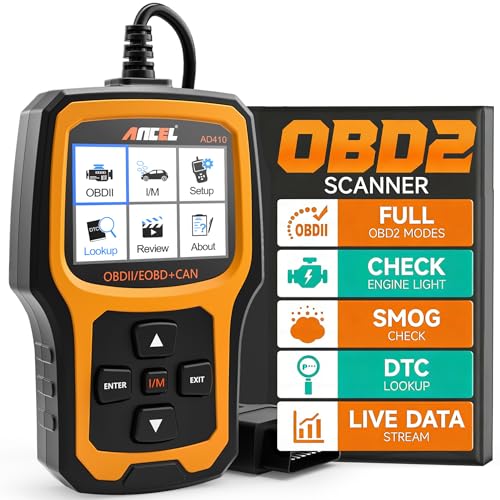
🔵 Alternative 1: ANCEL AD410
Best for: DIY owners who want a well-known engine scanner with a big color screen and live data at a similar budget level.
Key specs: Color display | Live data and freeze frame | Engine-only diagnostics | Check listing for full protocol and vehicle coverage
Where it beats the main product: It’s a more established name in the code-reader space, which some buyers trust for long-term support.
Where it falls short: Like the Zmoon, it’s still engine-only, so you don’t gain ABS or SRS coverage by switching.

- 【Diagnose Check Engine Light in Seconds – No Mechanic Needed】The...
- 【Clear & Reset CEL with Confidence】Unlike cheap code readers that...
- 【Sm-og Check Helper – Know Your Pass/Fail Status Before the...
⚪ Alternative 2: FOXWELL NT301
Best for: Buyers who want a step up in brand reputation and a scanner that’s widely reviewed in the DIY community.
Key specs: Color screen | Engine code read and clear | Live data | Check listing for exact screen size and update details
Where it beats the main product: It carries a stronger reputation among experienced DIYers, which can matter if you plan to keep a scanner for years.
Where it falls short: It’s the pricier of the three, so you’re paying more for the brand name and not necessarily more engine features.
If I just want to read a check engine light and check I/M readiness before a smog test, the Zmoon ZM201’s 50,000-code database and 2.8-inch color screen cover that well. I’d point a buyer who wants a more established brand toward the ANCEL AD410 or FOXWELL NT301 instead. But if you need ABS, SRS, or transmission codes, none of these three will do it — you’ll need a higher-tier bidirectional scanner.
How It Actually Performs
Setup and First Scan
I plugged the ZM201 into the OBD2 port under the steering wheel, turned the ignition on, and had results on screen within seconds — no app, no pairing, no setup screens to click through. The unit pulls its power straight from the port, so there’s no battery to charge before the first use. That plug-and-play behavior matched the claim exactly, and for a beginner that’s the whole point.
Screen Readability and Interface
The 2.8-inch display at 320×240 is sharp enough to read fault codes and menu labels clearly, and the adjustable brightness plus light/dark modes helped when I moved from a sunny driveway to a dim garage. The shortcut keys and visual vehicle status indicators cut down the menu digging I expected. It’s not a big tablet-style screen, but for engine codes it does the job without squinting.
Diagnostic Depth
The 50,000-code built-in DTC database is the headline, and it gave me plain explanations rather than just a number. I also used the live data stream in graph view, freeze frame, O2 sensor test, and the EVAP and onboard monitoring checks. It’s honest about its limits, though — it reads engine codes only, so I got nothing on ABS, SRS, or transmission systems. That’s a real gap if you’re chasing a non-engine warning light.
Code Clearing and Everyday Reliability
Clearing temporary fault codes and turning off the check engine light worked as described, and the I/M readiness check is genuinely useful before a smog test. One thing to know: permanent fault codes only clear after the actual repair, so the tool won’t magically wipe a hard fault. The 3-year warranty and pre-shipment testing give me confidence it’ll hold up, and the compact 3.45″ x 0.92″ x 6″ body tucks into a glovebox easily.
Who Is This OBD2 Scanner Best For?
This scanner makes the most sense for people who’d rather see the code themselves than pay a shop just to read it. Here’s how I’d sort out whether it’s your tool.
✅ This Is a Great Fit If You…
- You drive a vehicle after 1996 (US), 2002 (EU), or 2008 (Asia) with a standard 16PIN OBD2 port and want to read your own engine codes.
- You’re a beginner or DIY owner who wants a no-learning-curve tool with a 2.8-inch color screen, shortcut keys, and visual status indicators.
- You’ve got a check engine light and want to check I/M readiness before a smog test or clear a temporary code without a shop visit.
- You want live data, freeze frame, O2 sensor, and EVAP checks in one compact scanner that powers straight from the port with no charging.
❌ You Might Want to Look Elsewhere If…
- You need to read ABS, SRS, or transmission codes — this tool is engine-only and won’t touch those systems.
- You’re a Mac user who wants to review and print data on a computer, since the PC software runs on Windows XP/7/8/10 only.
- You’re chasing a permanent fault code and expect a scanner to wipe it — the repair has to happen first.
My number one pick here is the DIYer who just wants to understand and clear an engine light without paying for a diagnostic visit — the Zmoon ZM201 OBD2 Scanner Diagnostic Tool is built for exactly that job.
- [ Wide Vehicle Compatibility ] This OBD2 diagnostic scanner works for...
- [ Essential Engine Diagnostics, Save Time & Cost ] Quickly read and...
- [ Live Data & Freeze Frame Diagnostics ] Go beyond basic code reading...
Common Issues & Fixes
Even a plug-and-play tool can throw a curveball, so here are the snags I hit or hear about most, plus what actually fixed them.
The Scanner Won’t Power On
The problem: You plug it in and the screen stays dark because the ignition isn’t actually on or the port isn’t getting power.
My fix: Turn the ignition to the ON position (not just accessory) and reseat the 16PIN connector firmly. If it’s still dead, check your fuse box for a blown cigarette/accessory fuse that feeds the OBD2 port.
No Communication With the Vehicle
The problem: The tool powers up but shows a linking or communication error instead of codes.
My fix: Confirm your car is post-1996 (US) and actually has a 16PIN OBD2 port, then cycle the ignition off and on before rescanning. Some vehicles need the engine running rather than just the key turned for the tool to link.
The Check Engine Light Won’t Stay Off
The problem: You clear the code and the light comes right back, which feels like the scanner failed.
My fix: That’s usually a permanent fault code, and those only reset after the actual repair is done. The ZM201 can clear temporary codes, but a hard fault needs fixing first — then rescan to confirm it’s gone.
PC Software Won’t Connect
The problem: You want to review or print data on a computer and the software won’t talk to the scanner.
My fix: Make sure you’re on Windows XP/7/8/10 — it doesn’t support Mac. Install the update/printing software from Zmoon first, then connect, and keep the scanner powered from the vehicle port during the transfer.
Warranty & Support
Each ZM201 is tested before shipment and backed by a 3-year warranty, plus the brand advertises 7*24H support. If something’s off, reach out to Zmoon through your Amazon order and have your ASIN (B0C2V3RYLY) handy — and remember Amazon’s 30-day return window covers you early on.
- [ Wide Vehicle Compatibility ] This OBD2 diagnostic scanner works for...
- [ Essential Engine Diagnostics, Save Time & Cost ] Quickly read and...
- [ Live Data & Freeze Frame Diagnostics ] Go beyond basic code reading...
Frequently Asked Questions
Does the Zmoon ZM201 work on my car?
If your car was built after 1996 in the US, 2002 in the EU, or 2008 in Asia and has a standard 16PIN OBD2 port, it should work. It supports all the OBDII protocols, including KWP2000, ISO9141, J1850 VPW, J1850 PWM, and CAN. I’d just double-check your port before buying, since older pre-1996 cars won’t be compatible.
Can it read ABS, SRS, or transmission codes?
No — the ZM201 is engine-only. It reads and clears engine fault codes, turns off the check engine light, and handles I/M readiness, live data, freeze frame, O2 sensor, and EVAP checks. If you need ABS, SRS, or transmission diagnostics, you’ll want a higher-tier bidirectional scanner instead.
Does it need a battery or charging?
Nope. The scanner draws power directly from the vehicle’s OBD2 port, so there’s no battery to charge and no app to pair. I just plug it in, turn the ignition ON, and it’s ready in seconds. That’s what makes it so easy for a first-time DIY owner to pick up and use.
Why won’t the check engine light stay off after I clear it?
That usually means you’re dealing with a permanent fault code. The ZM201 can reset temporary codes, but permanent ones only clear after the underlying repair is actually done. Clear the code, fix the real problem, then rescan to confirm it’s gone.
Can I print or review data on a computer?
Yes, through the optional PC connection, but the software runs on Windows XP/7/8/10 only — it does not support Mac. You’ll need to install Zmoon’s update and printing software first, then connect while the scanner is powered from the vehicle port.
What’s the warranty and screen like?
Each unit is tested before shipment and comes with a 3-year warranty plus the brand’s 7*24H support. The 2.8-inch display runs at 320×240 with adjustable brightness and light/dark modes, so it stays readable in a bright driveway or a dim garage. The whole thing is compact too, at 3.45″ x 0.92″ x 6″.
My Final Verdict
I’d recommend the Zmoon ZM201 OBD2 Scanner to any DIY owner who wants to read and clear an engine light without paying a shop. The 50,000-code DTC database, the 2.8-inch 320×240 color screen, and the plug-and-play power from the OBD2 port all deliver what they promise. It’s a focused tool for engine diagnostics — and it’s honest about that. I would not recommend it to anyone who needs ABS, SRS, or transmission codes read.
The engine-only limitation is real, and Mac users can’t use the PC printing software either. But for the common case — a check engine light and a smog test looming — the 3-year warranty and 4.5-star rating from 2,637 reviews make this a confident buy.
Ready to Check the Price?
If you just want to understand your check engine light without a shop visit, this is a simple, no-setup scanner worth a look.
As an Amazon Associate I earn from qualifying purchases at no extra cost to you.