
Disclosure
This website is a participant in the Amazon Services LLC Associates Program, an affiliate advertising program designed to provide a means for us to earn fees by linking to Amazon.com and affiliated sites.
Diagnosing USB charger charging rates with a digital multimeter means measuring the charger’s output voltage and current under load, then comparing those readings to the charger’s rated specs. A USB power meter or a test load resistor paired with the multimeter makes this measurement practical.
I start by checking the no-load voltage, then add a known load to see how far the voltage sags and how much current actually flows. That gap between the label and the real numbers tells me whether a charger is honest or just overrated.
Stop Guessing at Charging Speed
Most cheap meters round small current readings, so a charger that looks fine can be quietly underperforming. The FNIRSI DMT-99 gives you 9999 counts and true RMS, so the milliamp numbers you read are real. That means you can spot a weak charger or bad cable in seconds, not guesswork.
What ended my charging-speed guessing game: FNIRSI DMT-99 9999 Counts TRMS Digital Multimeter
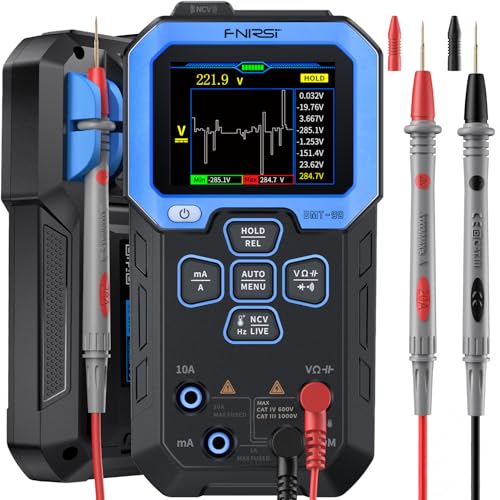
- 【9999 Counts & Rechargeable】FNIRSI DMT-99 digital multimeter...
- 【Smart Auto-Identification】Streamline troubleshooting with...
- 【Graphic Waveform & Monitoring】This automotive multimeter plots...

Why Checking USB Charger Charging Rates Actually Matters
A charger that lies about its output can cost you real time every single day. I learned this the hard way when my daughter’s tablet took almost six hours to fill up on a charger rated for fast charging. The label promised speed, but the actual charging rate was crawling.
That slow charge turned into a daily battle. She would plug in after school, then get frustrated when the battery barely moved by bedtime. We blamed the tablet at first.
The real problem was a cheap charger that could not deliver the current it claimed.
How a Weak Charger Wastes Your Money and Patience
Most of us buy a charger, plug it in, and never question it. In my experience, that is exactly how bad chargers stay in our homes for years. You keep buying cables, rebooting devices, and blaming the wrong thing.
- Long charge times that eat into your evening
- Replacement chargers bought to “fix” a device that was never broken
- Devices that shut down mid-use because the battery never catches up
Why Voltage Drop Signals a Real Problem
A good charger holds steady voltage while it works. A weak one sags under load, and that drop is the clearest sign something is wrong. Measuring it takes a minute and saves months of guessing.
How to Test a USB Charger’s Real Charging Rate
Testing a charger is simpler than most people think. I use a small USB power meter in line with the cable, and it shows voltage and current live. No fancy lab gear needed.
What You Need to Measure Charger Output
You only need two things to get started. A digital multimeter and a way to load the charger are enough. Here is what I keep in my drawer:
- A digital multimeter with a DC voltage setting
- A USB power meter or a USB test load
- A known good cable you trust
Reading Voltage and Current Under Load
Plug the meter between the charger and your phone, then watch the numbers. A healthy charger holds close to 5 volts while current flows. If the voltage drops well below that, the charger is struggling.
Compare the current reading to the charger’s label. A charger rated for 2 amps that only pushes 0.5 amps is not doing its job. That gap is the whole reason we test.
Testing the Same Charger on Different Cables
Swap cables and repeat the test before you blame the charger. In my experience, a worn cable causes more slow charges than the charger itself. One quick swap tells you which part is guilty.
You are tired of watching the battery crawl up while your kid waits and the evening slips away. Stop guessing which charger is failing and grab what finally worked for us: the tester I keep in my kitchen drawer.

- Wide Application - The AstroAI M4K0R Multimeter accurately measures...
- Non-Contact - Fully safe non-contact voltage testing with sound and...
- Thoughtful Design - Support Data Hold, Max, Auto Shut-off, low battery...
What I Look for When Buying a Digital Multimeter for Charger Testing
You do not need a lab-grade meter to check a USB charger. A few simple features matter far more than a long spec sheet. Here is what I actually check before buying one.
Accurate DC Voltage and Current Ranges
Your meter needs to read DC volts and DC amps cleanly in the low ranges. USB chargers live around 5 volts, so a meter that is sloppy at that level tells you nothing useful. I check the accuracy rating for DC voltage first, because a small error here hides real problems.
A Clear, Easy-to-Read Display
You will be squinting at small numbers while holding two probes. A bright backlit screen with big digits saves a lot of frustration. In my experience, a cheap meter with a dim display ends up in a drawer within a month.
Solid Probe Leads and Good Build Quality
Flaky leads give you flaky readings, and bad readings send you chasing ghosts. I tug gently on the leads before buying and look for thick insulation. A meter that survives being dropped on the garage floor is worth more than one with extra buttons.
Useful Extras Like Auto-Ranging
Auto-ranging picks the right scale for you, so you do not have to guess. For someone testing chargers now and then, that one feature removes most of the learning curve. It is the difference between a quick check and a confusing afternoon.
The Mistake I See People Make With USB Charger Testing
The biggest mistake is testing a charger with no load attached. A charger sitting idle can show a perfect 5 volts and still fall apart the moment your phone asks for real current. I made this exact error for years and trusted chargers that were quietly failing.
You have to put the charger under load to see the truth. Plug in your phone or a test load, then watch the voltage while current flows. That is when a weak charger shows its true colors, and the numbers finally mean something.
Second mistake: blaming the charger before checking the cable. Swap the cable first, then retest. In my experience, a worn cable causes more slow charges than a bad charger ever does, and one quick swap saves you from buying the wrong replacement.
You dread that slow crawl on the battery icon while everyone waits and the evening drains away. Stop guessing and grab what finally worked for us: the tester I wish I had bought years ago.

- CAT III 600V Safety Rating: Ensuring your safety when working on...
- AC/DC Voltage Measurement up to 1000V: Quickly and accurately measure...
- AC/DC Current Measurement up to 10A: Accurately measure AC and DC...
Test the Whole Chain, Not Just the Charger
Here is the tip that changed how I test everything: measure the voltage at the phone end, not at the charger. The charger might be perfect while the cable and connector quietly eat the power before it ever arrives. That single change turned my guessing into real answers.
I plug the meter in right before the device and watch the voltage under load. If the charger shows a healthy 5 volts but the phone end reads much lower, the cable is the thief. You can then swap cables and watch the number climb back up in seconds.
This also explains those mystery slow charges that come and go. A loose connector or a worn cable drops voltage only when you wiggle it or set the phone down. Testing at the device end catches those gremlins that testing at the charger never will.
Once you see the difference between the two readings, you will never trust a charger’s label again. That is the aha moment worth having.
My Top Picks for How to Diagnose USB Charger Charging Rates With a Digital Multimeter
Fluke 17B+ Digital Multimeter for Electrical Applications — The One I Trust for Numbers I Can Rely On
The Fluke 17B+ is the meter I reach for when a reading really has to be right, and its DC accuracy is the reason I keep it around. It is a perfect fit for anyone who tests chargers often and wants steady, repeatable results. The honest trade-off is the price, which is steep if you only check a charger twice a year.
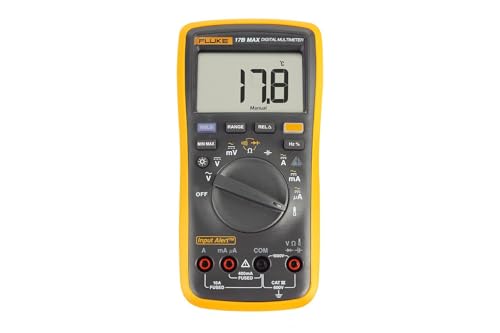
- CAT III 600V Safety Rating: Ensuring your safety when working on...
- AC/DC Voltage and Current Measurements up to 1000V and 10A: Allowing...
- Resistance, Continuity, Capacitance: Essential measurement functions...
TESMEN TM-510 Digital Multimeter 4000 Counts Smart — What I Hand to Friends Who Just Want Quick Answers
The TESMEN TM-510 is the meter I recommend to friends who want simple, fast readings without a learning curve. It is auto-ranging and smart, so you turn it on and it picks the right setting for you. The trade-off is that it feels less rugged than a pro-grade meter, so treat it gently.

- Smart Digital Multimeter: Thanks to its Smart Auto Mode, TESMEN TM...
- Non-contact: Completely safe Non-Contact Voltage test with a visual...
- Safety Guarantee: CAT II 600V, CE, and RoHS certified. Overload...
Conclusion
The one thing worth remembering is that a charger only tells the truth under load, so always test with the device plugged in. My whole approach boils down to that single habit, and it has saved me more money than any spec sheet ever did.
Grab your meter right now and test the charger you use most — it takes about two minutes, and it might be the reason your phone has been crawling all along.
Frequently Asked Questions about How to Diagnose USB Charger Charging Rates with a Digital Multimeter?
What voltage should a healthy USB charger show under load?
A healthy USB charger should hold close to 5 volts while current flows, usually staying above 4.75 volts. Small drops are normal, but a big sag means the charger is struggling to keep up.
I test mine with the phone plugged in and watch the number for a few seconds. If it slides well below 5 volts, I swap the cable first, then the charger. That order saves me from buying the wrong part.
Can I check charging current with a basic digital multimeter?
No, a basic multimeter cannot measure current directly in line with a USB cable without extra gear. Most meters max out around 10 amps, but you still need a way to break into the USB connection safely.
I use a USB power meter for current and keep the multimeter for voltage checks. Together they give me the full picture. Trying to probe a live USB port with bare leads is a good way to short something.
Why does my charger show 5 volts but my phone still charges slowly?
Your charger likely holds voltage fine but cannot deliver enough current, or the cable is dropping power before it reaches the phone. Voltage alone does not tell the whole story.
Check the current reading under load and compare it to the charger’s label. In my experience, a worn cable is the usual culprit. Swap it and retest before you blame the charger.
Which digital multimeter won’t let me down when I need accurate charger readings?
The TESMEN TM-510 is a solid choice for everyday charger testing, with 4000 counts and smart auto-ranging that picks the right setting for you. It reads DC voltage cleanly in the range USB chargers actually use.
For most people testing chargers at home, it does everything you need without a steep learning curve. I point friends toward what I grabbed for my own toolbox when they just want reliable numbers fast.
- Smart Digital Multimeter: Thanks to its Smart Auto Mode, TESMEN TM...
- Non-contact: Completely safe Non-Contact Voltage test with a visual...
- Safety Guarantee: CAT II 600V, CE, and RoHS certified. Overload...
What is the best digital multimeter for someone who tests chargers often?
The Fluke 17B+ is the meter I trust when readings have to be right every time, thanks to its tight DC accuracy. It costs more, but it holds steady numbers and survives real use.
If you test chargers weekly or fix devices for others, that reliability pays for itself. It is the one I would buy again, and I have sent more than one friend to the meter I keep in my garage.
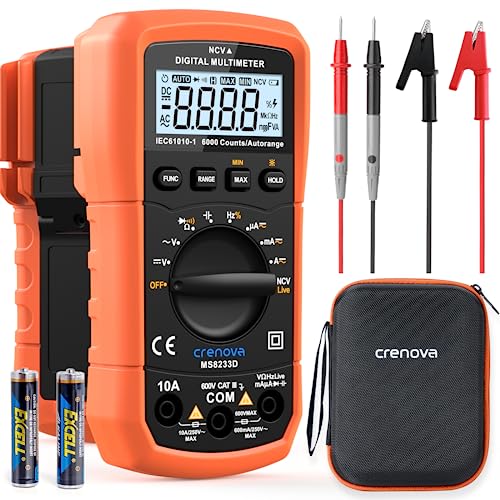
- 【More Versatile than Expected】MS8233D multimeter can accurately...
- 【User and Device Protection】The digital multimeter conforms to...
- 【6000-Count LCD Screen】Equipped with a 6000-count (3 5/6 digits...
How do I test a charger safely without damaging my phone?
Always test with a known good cable and never probe a live USB port with bare metal leads. Use a USB power meter or a proper test load instead of touching the contacts directly.
I keep my hands off the pins and let the meter do the work. If a charger feels hot or smells odd, stop and unplug it. No reading is worth a damaged phone or a burned finger.